What is App Store Optimization (ASO)?
If you’re in the marketing bubble, you’ve likely heard the acronym “ASO,” which stands for app store optimization.
App store optimization is a growing priority for mobile app publishers, and pairing it with user engagement tools for apps, such as push notifications and in-app messaging, helps turn new downloads into loyal users.
Take the following statistics for context:
- As of 2026, there are over 2.24 million apps in the Apple App Store and over 3.6 million apps in the Google Play Store
- Searches in the app store drive 67 percent of new downloads
How important is app store optimization?
Think about the standard steps app users take in finding the app that scratches their itch. Research shows that the most common way users find apps is through native app store search.
Most consumers are familiar with the process of opening the app store, querying what you’re looking for, and viewing the top few listings that appear.
To support this, Google reports that 40 percent of phone users search for apps within app stores.
With over five million apps on the market, competition for visibility is intense, and ranking high in app store search results only gets harder over time.
Investing in ASO strategy now gives your app a stronger foundation for long-term ranking growth, and pairing it with user engagement tools for apps — such as push notifications and in-app messaging — helps retain the users you acquire through search.
Benefits of app store optimization
Here are some additional key benefits you can expect from ASO.
Increase Discoverability: ASO helps you get noticed by the right users by increasing your chances of appearing high in the search results.
Decrease Acquisition Costs: ASO lets you reach users through organic search instead of relying heavily on paid ads, so you can reduce customer acquisition costs and put more resources into the customer experience.
Reach Global Audiences: By optimizing your app listing for different regions, you can localize for global audiences who may now better find and appreciate your offering. This will help you expand into new markets.
Increase Installs: More installs are the clearest payoff from ASO. The higher your app ranks in popular stores, the more downloads it earns over time, which also feeds the retention and engagement work that follows first install.
How does app store optimization work?
ASO focuses on improving your app's visibility in popular app stores to drive more click-throughs, downloads, and conversions.
The process of creating an ASO strategy consists of taking the time to optimize each important element of your app’s listing. Although ASO is often compared to SEO, the process of optimizing your app for app stores is significantly more straightforward than optimizing for web searches. SEO depends on hundreds of factors, whereas ASO can be narrowed down to a smaller number of components.
The exact steps you take to optimize your app for the Apple App Store and the Google Play store will depend on each store’s unique ranking algorithm.
Each algorithm scores your app in a different way, so you’ll want to do the appropriate research to learn how each works. Here, we’ll get into some background.
Optimizing for app store search on iOS and Android
In the process of developing, testing, and finally launching a mobile app, you’ll want to submit it to the most popular app stores in order to be published.
The two primary app marketplaces are the Apple App Store for iOS and the Google Play Store for Android. Both use distinct ranking algorithms, so understanding each platform's factors is essential for effective mobile app messaging software and user engagement tools for apps.
The key differences, which we’ll elaborate on below, include how each store handles keywords, rankings and reviews, and updates.
App store optimization best practices
1. Conduct keyword research
Successful ASO begins with keyword research. Start by understanding your target audience and the words and phrases they are likely to use when searching for apps like yours. ASO tools can help you identify relevant keywords and assess their search volume and competition. Incorporating long-tail keywords lets you target more specific, lower-competition search terms.
For both app stores, keywords are the number one component you need to focus on to achieve a favorable rank. Both the Apple and Google app stores will index your app based on keywords, with a couple of distinctions.
The Google Play Store will evaluate your app based on all text elements to rank you for keywords, whereas the Apple App Store gives you an explicit field for keywords. Keyword optimization in Google Play means writing your description and app title with your target keywords in mind.
Research keywords in your category and prioritize claiming those with high search volumes and low competition. The keywords you target will largely depend on your category and your competitors. In general, make sure not to keyword stuff to the point that it compromises the quality of your copy. Example keywords you can target include “fitness” and “weather.”
2. Optimize your app title & subheader
Your app's title is a critical element for ASO.
This is the first field that users see and use to understand what your app actually does. Not only that, but it’s also the biggest ranking factor that algorithms use in placing your app in the search results. Include relevant keywords in the title while keeping it readable. If your app is well-known, adding your brand name can increase recognition and reinforce credibility. These same principles apply when choosing mobile app messaging software or any other user engagement tools for apps, where discoverability depends on how clearly your title reflects core functionality. Try to clearly communicate the value of your app in a concise and user-friendly way.
In both the Google Play Store and the Apple App Store, you’re limited to 30 characters.
Examples of well-optimized app titles:
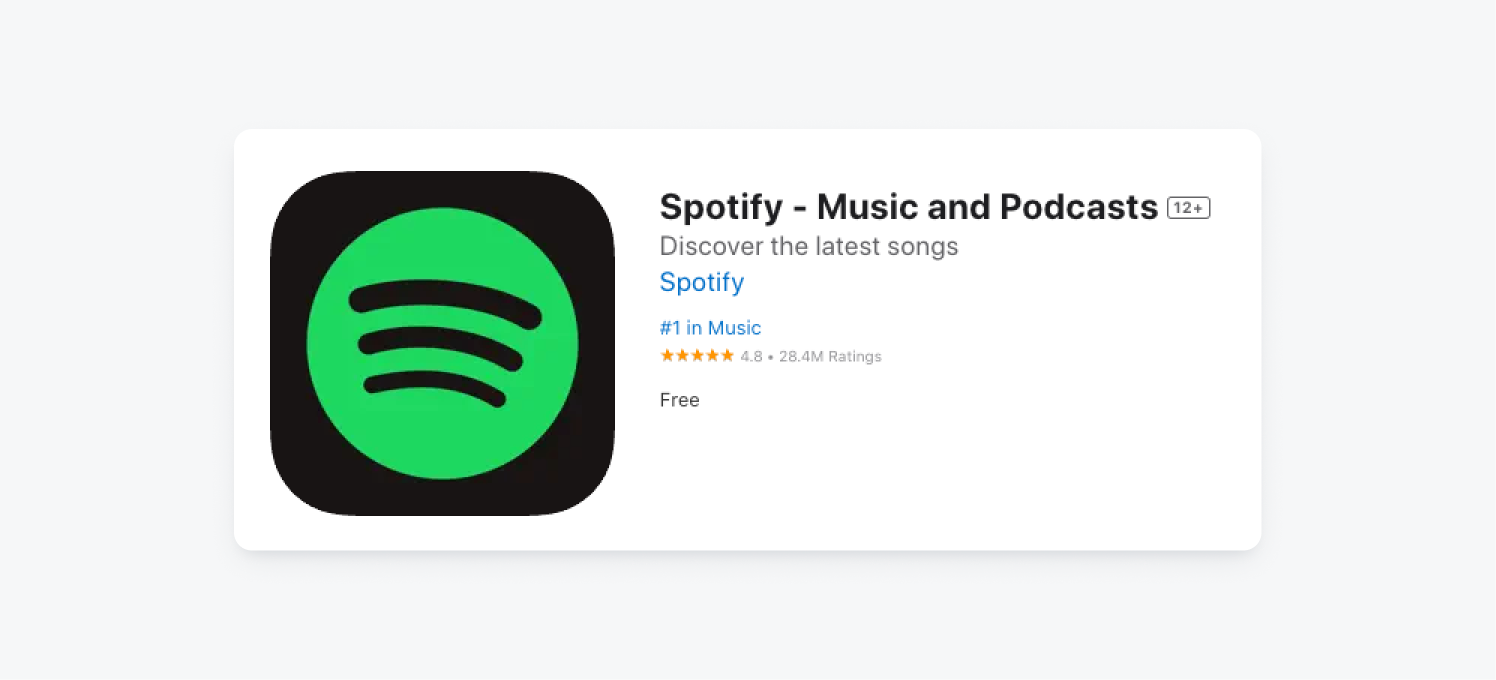
- Spotify - Music and Podcasts: This title pairs a well-known app name with the terms "Music and Podcasts," clearly indicating primary functionality. The subtitle, "Discover the latest songs," communicates value and encourages action.
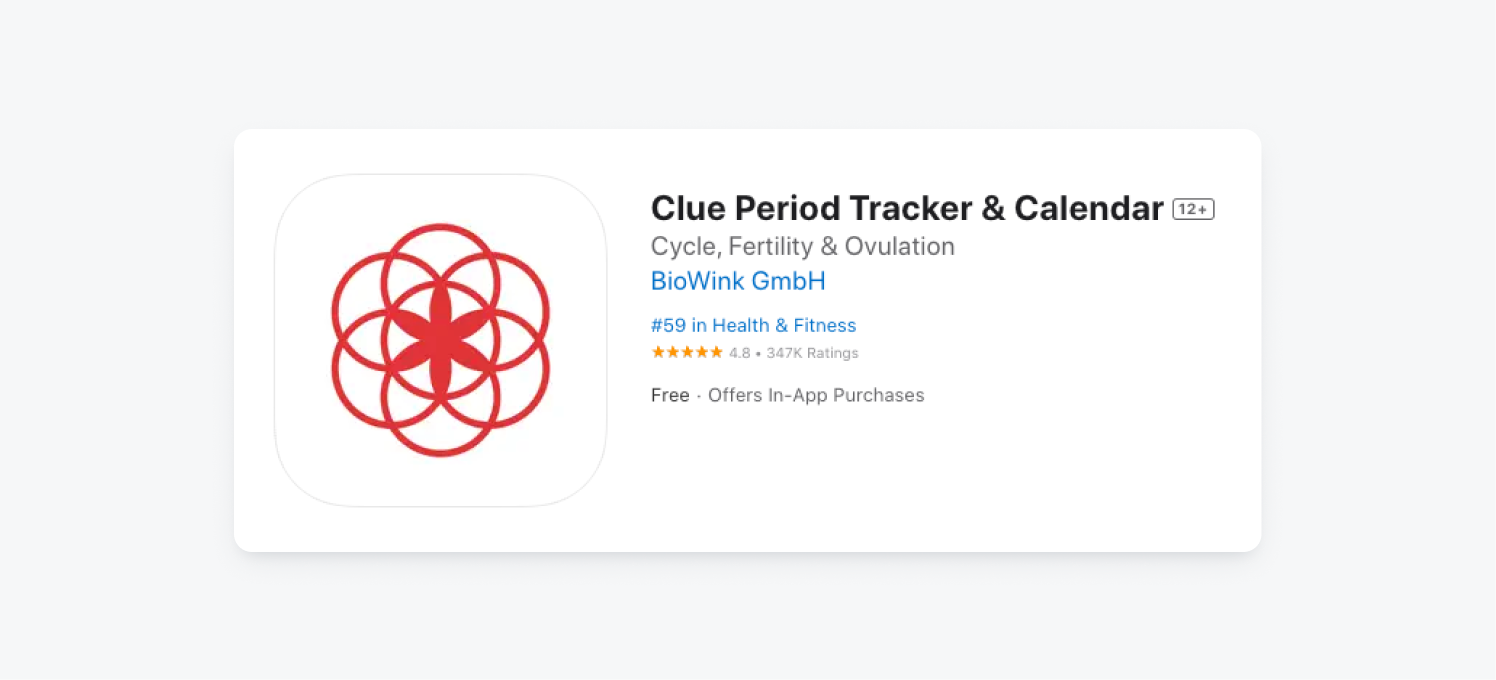
- Clue Period Tracker & Calendar: Here, "Clue" is a less recognizable name on its own, so "Period Tracker & Calendar" does the heavy lifting by stating the app's primary function concisely. Using "&" instead of "and" saves space and keeps the focus on keywords. The subtitle, "Cycle, Fertility & Ovulation," captures additional keywords and speaks to different user needs, from tracking a cycle to planning for conception.
3. Be thoughtful about your app icon
Your app icon is the first visual impression users have of your app, and a well-designed one can significantly impact its click-through rate. Getting it right means creating something memorable that accurately represents what your app does.
Attributes of Well-Designed App Icons:
- Simplicity: A well-designed app icon is simple and uncluttered. It conveys the core concept or purpose of the app with a clear and easy-to-understand visual.
- Uniqueness: A distinctive icon stands out in the app store and helps users remember and recognize your app.
- Relevance: The icon is directly related to the app's functionality, so users can quickly understand what the app does.
- Consistency: The app icon maintains visual consistency with the app's brand and user interface. This consistency reinforces the app's identity.
- Scalability: It's designed to look good at various sizes, from small icons on the app store to larger icons on the device's home screen.
- Legibility: Text, if used, is legible at small sizes. Avoid cramming too much text or detail into the icon.
- Color Scheme: The color scheme is pleasing to the eye and is consistent with the app's overall branding. Color choice should evoke the right emotions and match the app's target audience.
- Visual Hierarchy: It effectively uses visual hierarchy to guide the user's focus to the most important elements of the design.
Example of a well-designed app icon: WhatsApp Messenger

This icon is a clean, green speech bubble that represents the app's core function of messaging and calls, with the green color reinforcing a sense of friendliness.
Attributes of poorly designed app icons:
- Too Much Complexity: A poorly designed app icon is overly complex, with too many elements that make it difficult to understand at a glance.
- Generic Design: It looks like countless other app icons and doesn't help the app stand out. Generic icons may result in users overlooking your app.
- Irrelevance: The icon may not clearly represent the app's function, leading to confusion among potential users.
- Inconsistency: It deviates from the app's overall branding or design language, leading to a lack of visual harmony.
- Legibility Issues: Text may be too small or difficult to read, especially on smaller screens. Users should not struggle to make out the app's name or purpose.
- Poor Color Choices: The use of colors may be jarring or unattractive, detracting from the overall aesthetic.
- Visual Noise: The icon may have excessive visual elements that create confusion rather than clarity.
- Lack of Focus: It doesn't effectively guide the user's eye toward the essential elements, making the purpose of the app unclear.
4. Optimize your app description
Your app's description is where you communicate key features, core benefits, and what sets your app apart from alternatives. Make sure to use relevant keywords naturally within the description to enhance discoverability. A clear, well-written description can directly affect whether a user decides to download your app, making it one of the most important user engagement tools for apps available to you before install.
Example of an effective app description:
5. Include clear screenshots and app previews
Visual assets such as screenshots and app previews are essential for communicating what your app does and why users should download it, making them a core part of any user engagement strategy for apps. Use them to tell a visual story that entices users. A/B testing different screenshots can help you determine which ones generate the most conversions, so experimentation is key.
Screenshots also give potential users a sneak peek into your app. You have the opportunity to include up to three in your app listing, so choose wisely in deciding what parts of your app to highlight.
You can also optionally include animations or videos in your app store listings. The videos you can display are referred to as app promo videos in the Google Play Store and previews in the Apple App Store. Make sure whatever video components you include clearly highlight your app’s core features and a positive user experience.
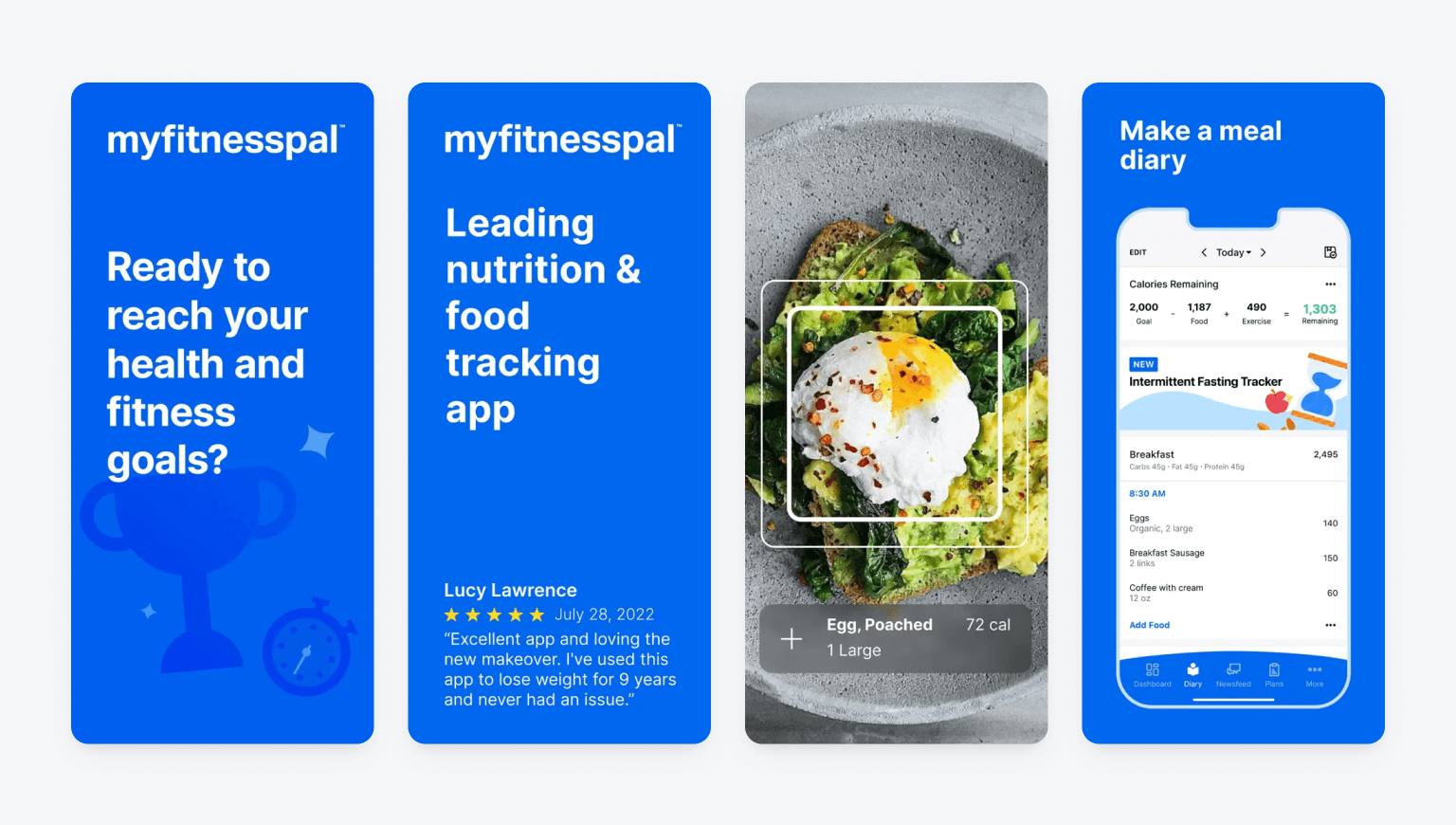
For example, one popular fitness app listing uses animations and visual imagery to help users preview the personalized setup process and in-app experience. They also dedicate image space to user reviews as social proof, alongside key features and value propositions.
6. Earn app reviews & ratings
Positive app reviews and high ratings can significantly impact an app's conversion rate. One of the most effective user engagement tools for apps is prompting satisfied users to leave reviews through in-app messages or push notifications at the right moment in their journey. These strategies can help you increase app reviews and improve your app rating.
Responding to user reviews, both positive and negative, shows users that their feedback shapes how the app improves, which builds trust and supports long-term customer retention.
Tips for responding to positive app store reviews:
- Express Gratitude: Start your response by thanking the user for their positive review. Show appreciation for their support and feedback.
- Personalize Your Response: Personalize your response by mentioning specific aspects of their feedback or the features they liked. This demonstrates that you've read their review and value their input.
- Reinforce Positivity: Briefly echo the specific points they praised. Repeating their highlights shows you read the review carefully and reinforces what makes the app worth using.
- Encourage Loyalty: Encourage the user to continue using your app and to share their positive experiences with others. This can help with user retention and word-of-mouth promotion.
- Provide Support or Assistance: Offer assistance or support, if relevant. If the user has mentioned an issue or suggested a feature, you can assure them that you're working on it or provide guidance.
Tips for responding to negative app store reviews:
- Stay Calm and Professional: Maintain a professional and empathetic tone in your response. Stay calm and avoid becoming defensive, even if the review is critical.
- Acknowledge the Issue: Start by acknowledging the user's concern or problem. Show that you understand their point of view.
- Apologize and Take Responsibility: If the issue is valid, apologize for any inconvenience or frustration the user experienced. Take responsibility for addressing the problem.
- Offer Solutions or Explanations (Not Excuses): Provide solutions to the issue or offer an explanation if necessary. Let the user know how you're working to resolve the problem or improve the app.
- Request More Details Privately: If the issue is complex or requires more information, ask the user to contact you privately to provide further details. This shows a commitment to resolving the problem.
- Highlight Improvements and Commitment: Mention any recent or upcoming updates or improvements to the app that address the user's concerns. This demonstrates that you're actively working to enhance the app.
- Thank Users for Feedback: Regardless of the review's negativity, thank the user for taking the time to provide feedback. Constructive criticism can help you make your app better.
7. Localize your app and your listing
If you intend to reach a global audience, consider localizing your app. For the app store, this involves translating your app's title, description, keywords, and visuals to cater to different markets. Be mindful of cultural nuances and preferences in various regions to ensure your app's appeal.
Beyond the app store, localizing your app experience pays off quickly. User engagement tools for apps often include localization features that let you tailor messaging by language, region, or cultural preference, making it easy to start seeing results without a full-scale redesign.
8. Invest in regular app updates
Regularly updating your app with new features and bug fixes is one of the most effective user engagement tools for apps, keeping existing users active while giving new users a reason to download. An app that receives regular updates demonstrates that the development team is active and attentive to user needs.
Keep the "What's New" section of your App Store listing current to highlight recent improvements and give potential users a clear reason to download or return to your app.
9. Leverage social and paid channels to market your app
Beyond ASO, promoting your app through various channels is critical. Social media platforms can extend your app's reach to audiences that organic search alone won't capture. Influencer partnerships can drive installs by putting your app in front of engaged, relevant audiences through trusted voices, and paid social ads let you retarget high-intent users with in-app messaging and push notifications to improve retention after the install.
10. Track and analyze the performance of your app store listing
Monitoring key ASO metrics helps you gauge the effectiveness of your strategies, from keyword rankings and conversion rates to download numbers. Analyzing user reviews and feedback identifies areas for improvement so you can make decisions grounded in real data.
Key app store optimization metrics include:
- Keyword Rankings: Keep an eye on the positions of your app in the search results for targeted keywords. Monitoring keyword rankings helps you understand how well your ASO efforts are driving visibility in the app stores.
- Organic Downloads: Measure the number of downloads your app receives from organic search results. These are users who discover and install your app without clicking on paid ads or external links.
- Conversion Rate: Calculate the percentage of users who visit your app's store listing and then proceed to download the app. A high conversion rate indicates that your app store page is effective in persuading users to install your app.
- App Ratings and Reviews: Track the average user rating and the number of reviews your app receives. Positive ratings and reviews can significantly impact app conversion rates and download numbers.
- Retention Rate: Measure how well your app keeps users coming back over time. A high retention rate signals that users find consistent value in the experience, which can improve your app's store ranking. Pairing retention tracking with a dedicated customer retention platform gives you deeper insight into where users drop off and what keeps them engaged.
- Click-Through Rate (CTR): Measure the percentage of users who click on your app's listing in search results. A higher CTR indicates that your app's icon, title, and visuals are compelling and attractive.
- Cost Per Install (CPI): For paid advertising campaigns, calculate the cost per install to understand the efficiency of your advertising spend. Lower CPI indicates more cost-effective user acquisition.
- App Store Impressions: Track how often your app store listing is shown in search results. Higher impressions can result from improved keyword rankings and an optimized app store page.
- User Engagement Metrics: Track sessions, time spent in the app, and completion of in-app actions to understand how users interact with your product. Strong engagement scores tend to improve rankings and reviews, and user engagement tools for apps can help you act on this data through targeted messaging and behavioral triggers rather than reviewing raw numbers alone.
- Localized Metrics: If your app is available in multiple regions, analyze performance metrics for each market. Different regions may have varying levels of competition and user behavior.
- Competitive Analysis: Regularly monitor the performance of competing apps, including their keyword rankings, ratings, and reviews. This helps you identify trends and opportunities in the market.
- App Store Listing Updates: Keep track of how changes to your app store page impact metrics like conversion rate and downloads. A/B testing can be used to determine the effectiveness of different elements on your page.
- User Feedback Analysis: Examine user reviews and feedback to identify trends and areas for improvement. Addressing user concerns can lead to higher ratings and better app performance.
- In-App Analytics: Use in-app analytics to understand how users behave inside your app. When combined with mobile app messaging software, this data can directly inform updates to features and trigger timely communications that re-engage users before they churn.
- App Uninstalls: Keep an eye on uninstall rates to understand why users are deleting your app. Reducing the uninstall rate is important for long-term success.
11. Test, iterate, and repeat
Your ASO strategy is an ongoing process, not a one-time task. Based on data and user behavior, continually refine your approach and keep your app store presence sharp.
A/B testing lets you systematically compare different versions of your app store listing elements to find what performs best. Testing keywords, app icons, screenshots, titles, descriptions, videos, and subtitles gives you the data to make smarter decisions and improve conversion rates, downloads, and visibility. For mobile apps, pairing A/B testing with user engagement tools gives you a fuller picture of what drives installs and keeps users active after they download.
12. Study your competitors
Competitive analysis is a core part of any App Store Optimization strategy, helping you understand where your app stands and find clear opportunities for improvement. When conducting a competitive analysis for ASO, here are the types of analysis you should consider:
- Keyword Analysis: Identify the keywords and search terms that your competitors are targeting in their app store listings. Analyze which keywords are driving traffic and downloads for their apps.
- App Store Rankings: Determine the rankings of your app and your competitors for relevant keywords. This helps you understand your app's visibility and competitiveness in search results.
- App Store Listings: Study the app store listings of your competitors. Analyze how they structure their titles, descriptions, and use of visuals like screenshots and icons. Look for trends and successful elements in their listings.
- User Reviews and Ratings: Read user reviews and ratings for your competitors' apps. Identify common pain points, feature requests, and positive aspects that you can learn from to improve your own app.
- App Updates: Monitor the frequency and content of updates your competitors release. Frequent updates often indicate an active and responsive development team, which can be a factor in ASO.
- App Localization: Investigate if your competitors are localizing their app listings for different regions. Analyze how well they adapt their app's content and keywords to cater to specific markets.
- Promotional Activities: Research the promotional strategies of your competitors. Are they running paid advertising campaigns or using social media and influencer marketing to promote their apps? Learn from their promotional tactics.
- User Engagement: Look at how users interact with your competitors' apps. Metrics like downloads, active user counts, and session durations reveal how popular an app is and how well it retains the people who install it. These are the same signals that user engagement tools for apps surface when evaluating your own performance.
- App Monetization: Explore how your competitors monetize their apps. Do they offer in-app purchases, subscriptions, or ads? Understanding their revenue model can help you make informed decisions about your own.
- Competitive Differentiators: Identify what makes your app stand out compared to your competitors. Assess your unique selling points and strengths and use this information in your ASO strategy.
- Updates and Iteration: Track changes in your competitors' app listings, such as updates to their titles, descriptions, and visuals. Competitive apps evolve, and analyzing their iterations can provide insights for your own updates.
- Negative Feedback: Pay attention to user criticisms or negative feedback for your competitors' apps. This can help you avoid making similar mistakes and improve your app's user experience.
The goal of competitive analysis is to gain insights, learn from your competitors' successes and failures, and find opportunities that give your app a genuine edge. A strong customer retention platform can help you act on those insights by automating follow-up messaging, tracking engagement trends, and keeping users coming back after they install.
ASO is an ongoing process, and staying informed about your competitors is essential for long-term success in the app marketplace. Pairing ASO insights with mobile app messaging software lets you quickly reach users with the right message based on what you learn about shifting market expectations.
App store optimization tools
There are a variety of app store optimization tools on the market that you can consider leveraging if you’d like to invest in a more in-depth ASO strategy. Common features include app store performance diagnostics, detailed analytics, keyword optimization, competitor monitoring, and ad intelligence.
Many ASO tools require a paid subscription, but free options exist to help you get started improving your app's visibility in the app stores — and pairing them with a mobile app messaging software or user engagement tools for apps can further strengthen your overall growth strategy.
Free ASO tools:
- Mobile Action's Free Option: This platform offers ASO keyword analysis and information about the app marketplace. The free version lets you track 5 keywords and provides recommendations on how to improve rankings.
- SearchMan: This tool focuses on app market intelligence, giving you insight into your app's visibility and how it compares to competing apps.
- Google Keyword Planner: This tool by Google helps you research and find relevant keywords for your app. It can be particularly useful for optimizing your app's presence on the Google Play Store.
- Apple Search Ads Campaign Manager: If you have an iOS app, Apple provides the Search Ads Campaign Manager for free. It can help you identify keywords and track the performance of your app's search ads.
- Sensor Tower's Free ASO Tool: Sensor Tower offers a limited free version of its ASO tool, which allows you to track your app's visibility and keyword rankings.
- Mobile Action's free ASO tool: Provides basic keyword tracking and app performance insights, as covered in the entry above.
- AppAnnie's Free Features: AppAnnie, a popular app analytics platform, offers some free features, including app performance tracking and basic ASO insights.
- Google Trends: Google Trends can help you identify trending keywords related to your app's category and niche. It's a valuable resource for keyword research.
- KeywordTool.io: This online tool can help you find long-tail keywords and generate keyword ideas for your app's ASO strategy.
- AppFollow's Free Plan: AppFollow offers a free plan that provides limited ASO features, such as keyword tracking and review monitoring.
- ASOdesk Free Plan: ASOdesk offers a free plan with basic ASO tools, including keyword research and competitor analysis.
- Apptweak's Free ASO Tools: Apptweak offers a limited set of free ASO tools, including keyword analysis and app performance insights.
These free tools are a practical starting point, but each has limitations compared to paid tiers. Paid ASO tools typically provide deeper data, broader keyword tracking, and more granular competitor analysis. For apps focused on growth, pairing free tools with a customer retention platform or mobile app messaging software can help translate ASO gains into lasting user engagement.
Paid ASO software:
The top-rated app store optimization tools of 2026 include AppTweak, App Radar, Data AI, AppFollow, ASO Mobile, Asodesk, Appfigures, ASO Tools, Checkaso, SensorTower, and SplitMetrics.
Keeping users engaged after download
One of the biggest problems that mobile apps face is app churn. 74 percent of users churn within one day of installing a mobile app. To get the most from your CAC spending and ASO work, creating a strong onboarding experience and building automated engagement campaigns are two of the most effective ways to keep users connected to your app.
OneSignal is a customer retention platform that is quick to set up, letting you automate onboarding flows and cross-channel engagement campaigns from an intuitive dashboard. As mobile app messaging software, OneSignal lets you build push notification campaigns, send in-app rating requests, run user surveys to collect feedback, and re-engage churned users — all from one place. If you don't have a OneSignal account, you can create one for free and start building campaigns today. Set them up once and continue to reap the rewards as your app grows!
Get Started for Free